How do you teach an AI how a telecom operator works?
You don’t train it. You model it.
I’ve spent over a decade building software, including taking six SaaS products to production with my own team at Infonium Technologies. The biggest lesson from all of that is simple: the features you ship quickly are easy to change, but the data model you design in week one is not. Get the model right and everything on top of it gets easier. Get it wrong and everything on top fights you.
That lesson matters even more with AI. An AI agent is only as good as the model of the world it works from. So here is how we model a telecom operator in NexusAI, step by step.
Start with a question, not a schema
The worst way to start is to list every table in the BSS and OSS. You’ll be at it for months and still not know what matters.
Start instead with a question that currently takes far too long to answer. For a telco, a good one is:
”Which customers were affected by last night’s outage at site 214, and which of them complained?”
Without a model, that is a week of joining spreadsheets across the network team, the customer team and the care team. Several queries, several people, often several days.
Now let’s model just enough of the operator to answer it in one go.
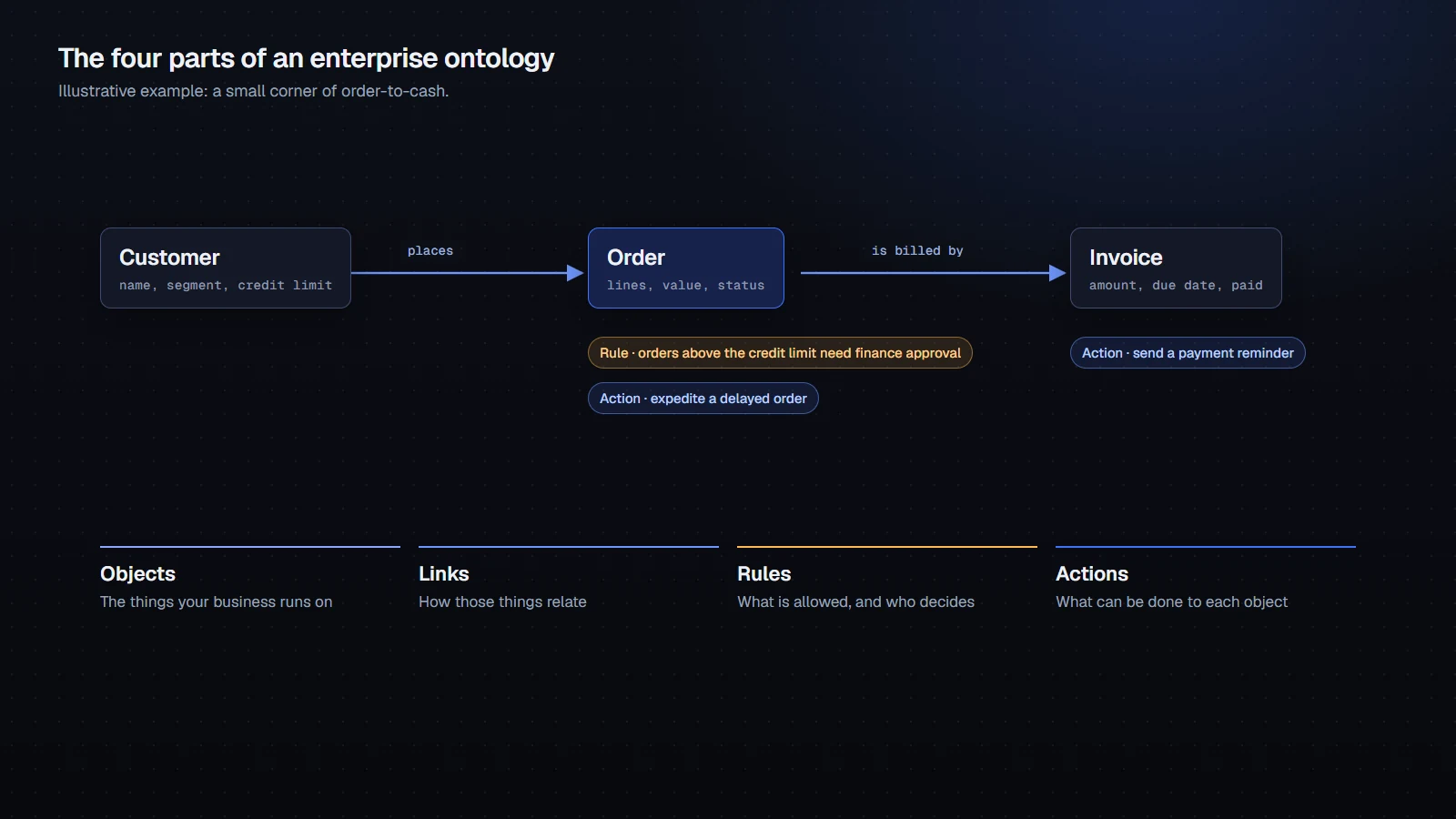
Step 1: The objects
Objects are the things the business runs on. For this question we need a handful:
- Cell site: a physical location with radio equipment.
- Cell: the coverage area a site serves.
- Subscriber: a person or line connected through a cell.
- Ticket: a complaint or fault report.
- Account: the commercial relationship, with its plan and credit.
- Invoice: the monthly bill.
- Transport link: the backhaul a site depends on.
Each object gets a name the business actually uses. Not “tbl_sub_mst”. Just “Subscriber”.
Step 2: The links
Links say how objects relate, in plain words:
- A cell site serves cells.
- A cell connects subscribers.
- A subscriber raises tickets.
- A subscriber belongs to an account, which is billed by invoices.
- A cell site depends on a transport link.
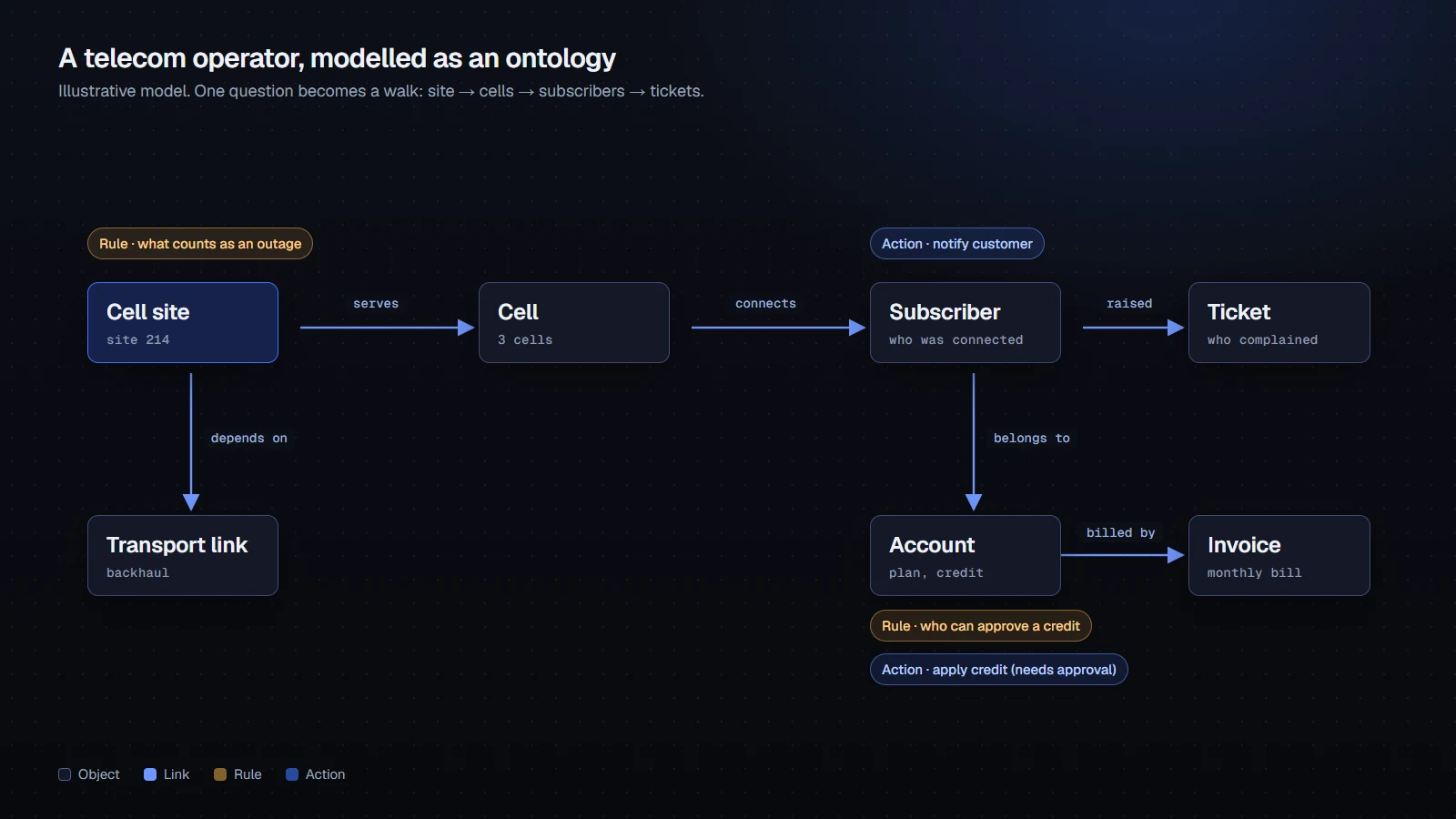
Now look at the question again. With these links in place, answering it is a walk: start at site 214, follow the links to the cells it serves, then to the subscribers on those cells, then to the tickets they raised. One walk instead of five joins.
The data didn’t move. The model just knows how it connects.
Step 3: The rules
Rules say what’s allowed and who decides. For a telco, two early ones are:
- What counts as an outage. Is it any alarm, or a loss of service above a certain duration and number of subscribers?
- Who can approve a credit. Up to what amount can a care agent decide, and when does it need a manager or finance?
Rules belong on the objects they govern. The outage rule lives on the cell site. The credit rule lives on the account. When rules live in a policy PDF, a wiki and one person’s head, every system re-implements them slightly differently, and an AI agent has no reliable way to know which version is real.
Step 4: The actions
Actions say what can be done to each object:
- Notify customer, on the subscriber.
- Open a ticket, on the subscriber.
- Apply a credit, on the account, which needs approval.
Defining actions up front matters a great deal once AI is involved. If an action isn’t defined, an agent simply can’t take it. That is a much stronger guarantee than asking a model nicely not to do something.
What one object type looks like up close
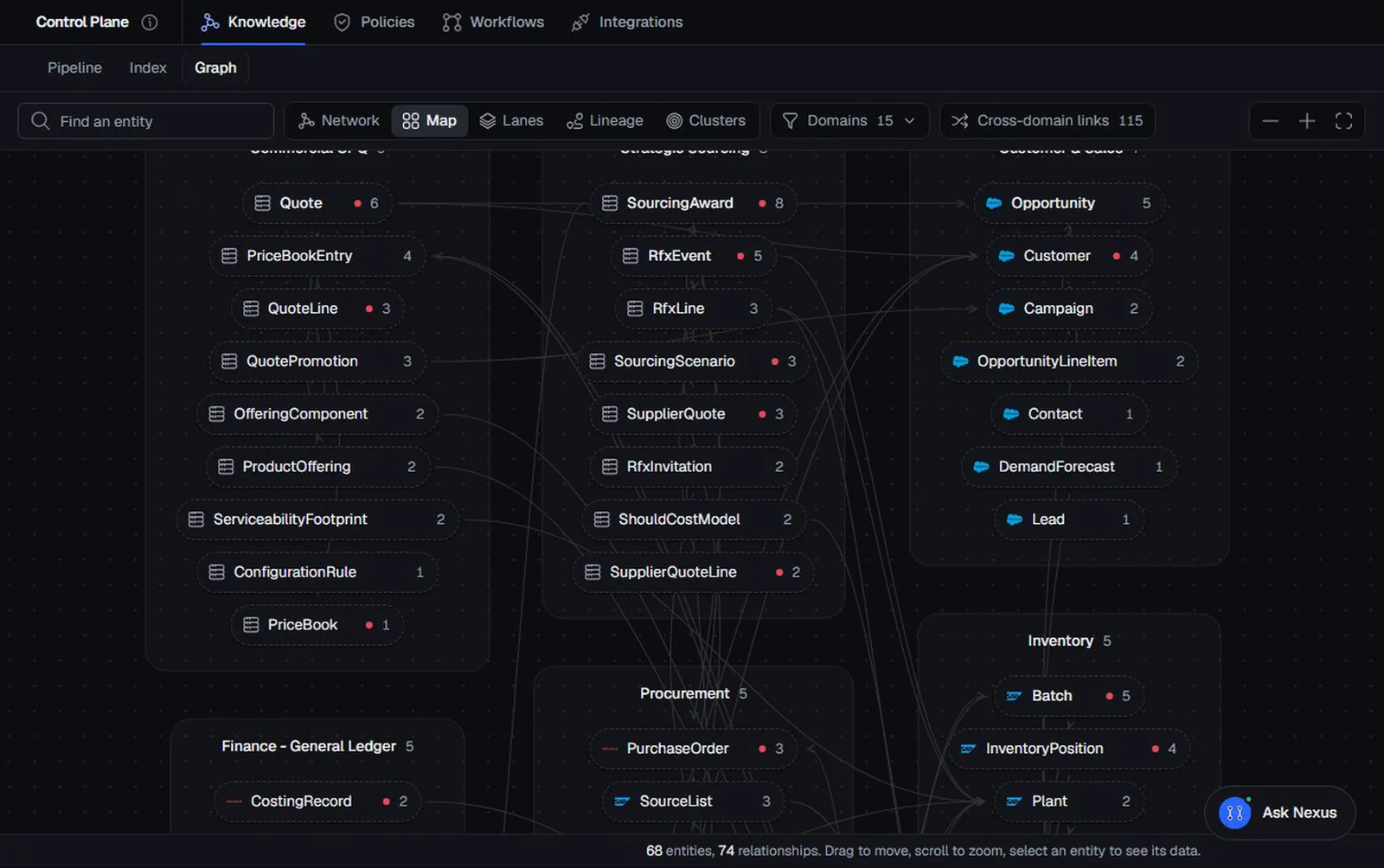
The diagram is the overview. In the product, each object type is described in detail, and this is where most of the real work happens.
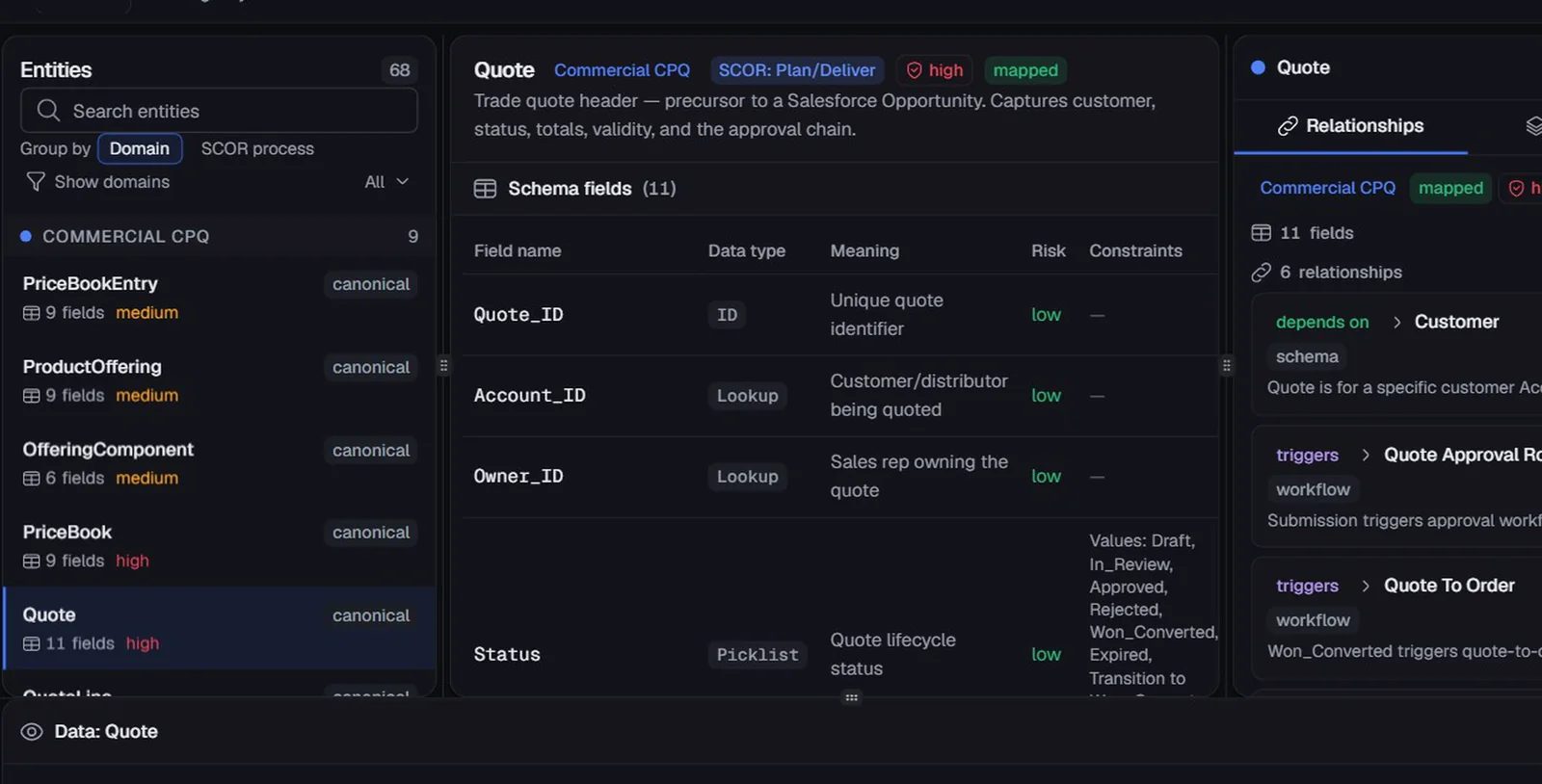
The example above is a Quote, but a telco Subscriber is built exactly the same way. Each object type has three parts:
- A name the business uses, with a plain description.
- Links to the rest of the model. A Quote depends on a Customer and triggers an approval workflow.
- Properties mapped to the source. Every field traced back to the system and column it comes from, with its meaning and type.
That third part is the one people underestimate. It’s what lets anyone, or any AI, answer “where did this number come from?” in one click.
Tables or a graph? Both.
I’m often asked whether this means replacing the data warehouse. It doesn’t.
Tables are excellent at storing facts. A graph is excellent at answering how facts connect. An ontology gives you both: your data stays in its systems, and the model on top knows how it all relates.
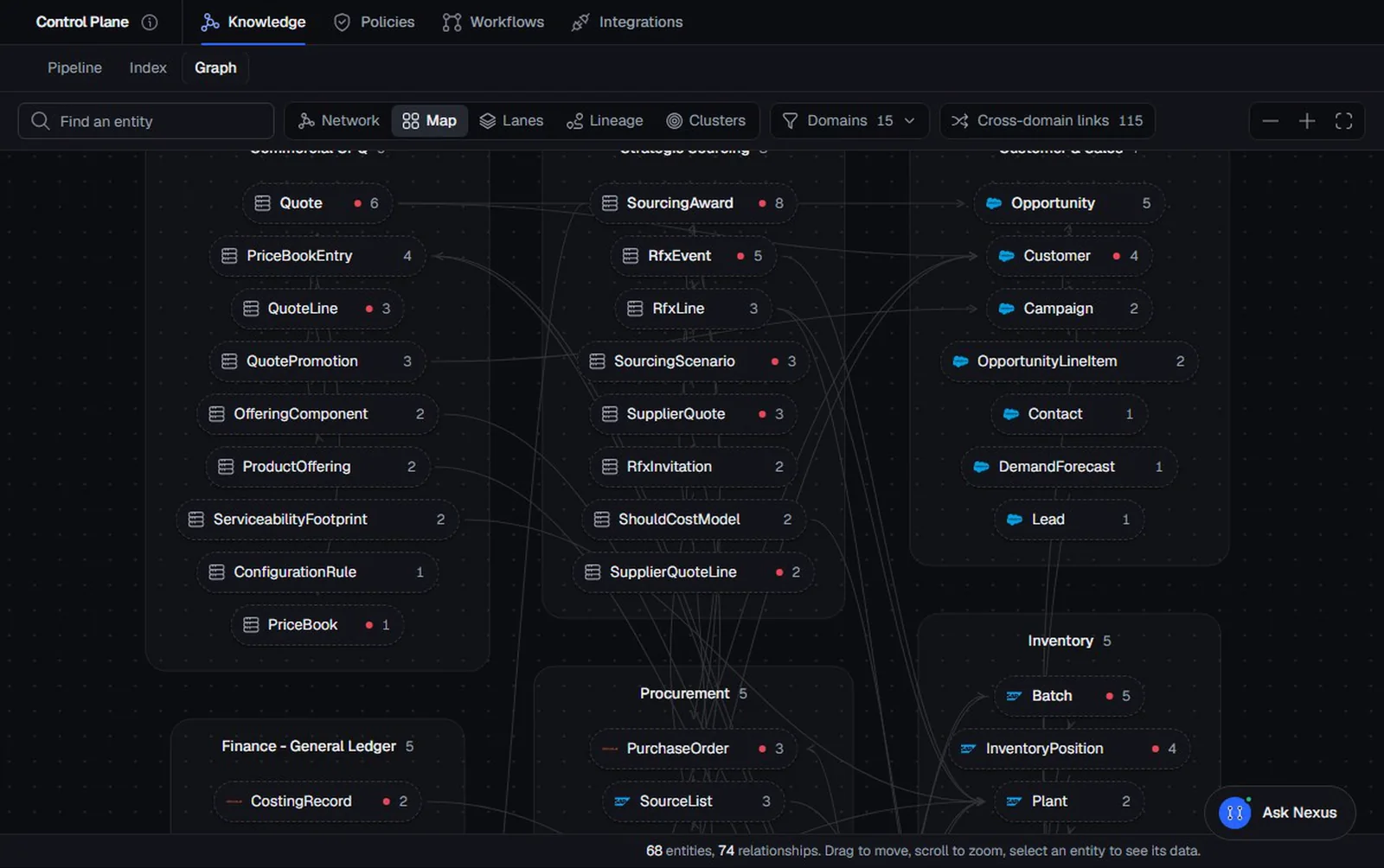
The example in our product tour has 68 object types and 74 relationships across 15 domains, which is what an ontology looks like after many questions have been modelled. Nobody designed it all on day one. It grew one question at a time.
The second question is cheaper than the first
Here is where the effort starts to pay off. Once the outage question works, try a second one:
”Which of the affected subscribers are on high-value accounts, raised a ticket, and qualify for a credit under our policy?”
Look at what it needs: cell site, cell, subscriber, ticket, account and the credit rule. Every one of those already exists in the model. The second question needed no new objects and only one rule that was already written down. The first question took the real effort. The second is much quicker.
That’s the real case for an ontology. Each question you model makes the next one cheaper, because the business is described once and reused everywhere.
Mistakes I’d avoid
A few patterns that make telecom models harder than they need to be:
- Modelling tables instead of the business. If an object is called “SUB_MST_V2”, the model has copied the database, not described the operator. Use the words the network and care teams use.
- Skipping the source mapping. An object without its properties traced back to systems and fields looks finished, but nobody can trust a number from it.
- Putting rules in prompts. “What counts as an outage” should be a rule on the cell site, owned by someone, not a sentence in an instruction to a model.
- Starting too big. A model of the whole operator on day one never finishes. A model of one question finishes in weeks, and grows from there.
Where to start with your own operator
If you want to try this, here’s the order I’d follow:
- Pick one question that takes days today and matters to an executive.
- Model only the objects that question needs. Usually five to ten.
- Map every property to its source system and field. Don’t skip this.
- Write down the two or three rules that govern those objects, and give each an owner.
- Define the actions, and decide which ones need a person’s approval.
One well-built object type teaches you how to build the next hundred.
Our customer operations solution for telcos shows where this leads, and Papu’s article on why enterprises need a second brain explains why the model matters more than the size of the AI.
Frequently asked questions
What is a telecom ontology?
A working model of how an operator’s business fits together. It describes the objects (subscribers, cell sites, tickets, invoices), the links between them, the rules that govern them and the actions people and AI are allowed to take.
Do we have to move our network and billing data to build one?
No. The ontology describes the data and maps each property back to the system and field it comes from. The data stays where it is, and queries go to the source.
Why use a graph instead of joining tables?
Tables are excellent at storing facts. A graph is excellent at answering how facts connect. A question like “which customers were hit by last night’s outage?” becomes one walk along the links instead of several joins across teams.
Where should we start?
With one question that currently takes too long to answer, and only the five to ten objects it needs. One well-built object type teaches you how to build the next hundred.