Most people’s first experience of AI at work was a chat box. You ask a question, you get an answer. Agentic AI is the next step, and it changes what AI can do inside a business.
An AI agent doesn’t just answer. It works through a task in steps, using tools to look things up and, when allowed, to take actions. That makes it far more useful. It also means you need to think much harder about control.
This guide explains what agentic AI is, how it works, and what an enterprise should put around it before letting it act.
From answers to actions
The simplest way to see the difference is with one question: ”Can we ship this order today?”
A chatbot, answering from general knowledge, can’t really help. It doesn’t know your order, your stock or your cut-off times.
An agent works it out step by step:
- Think. “I need the order, the stock for each line, and today’s cut-off time.”
- Pick a tool. From a fixed list: look up the order, check stock, read the cut-off.
- Act. Call the tool with exact inputs, such as the order number.
- Observe. Read what came back: two lines in stock, one line short.
- Repeat. “Is the short line arriving today?” Pick the next tool.
- Answer, with the trail. “Not in full. Two lines can ship today, one tomorrow.” Plus every tool call that led there.
This pattern is often called ReAct, short for reasoning and acting. In plain words, it’s how a careful person solves a problem they haven’t seen before.
What it looks like on screen
Here’s an agent working through a real question on our practice enterprise: ”Which suppliers are putting next month’s production at risk?”
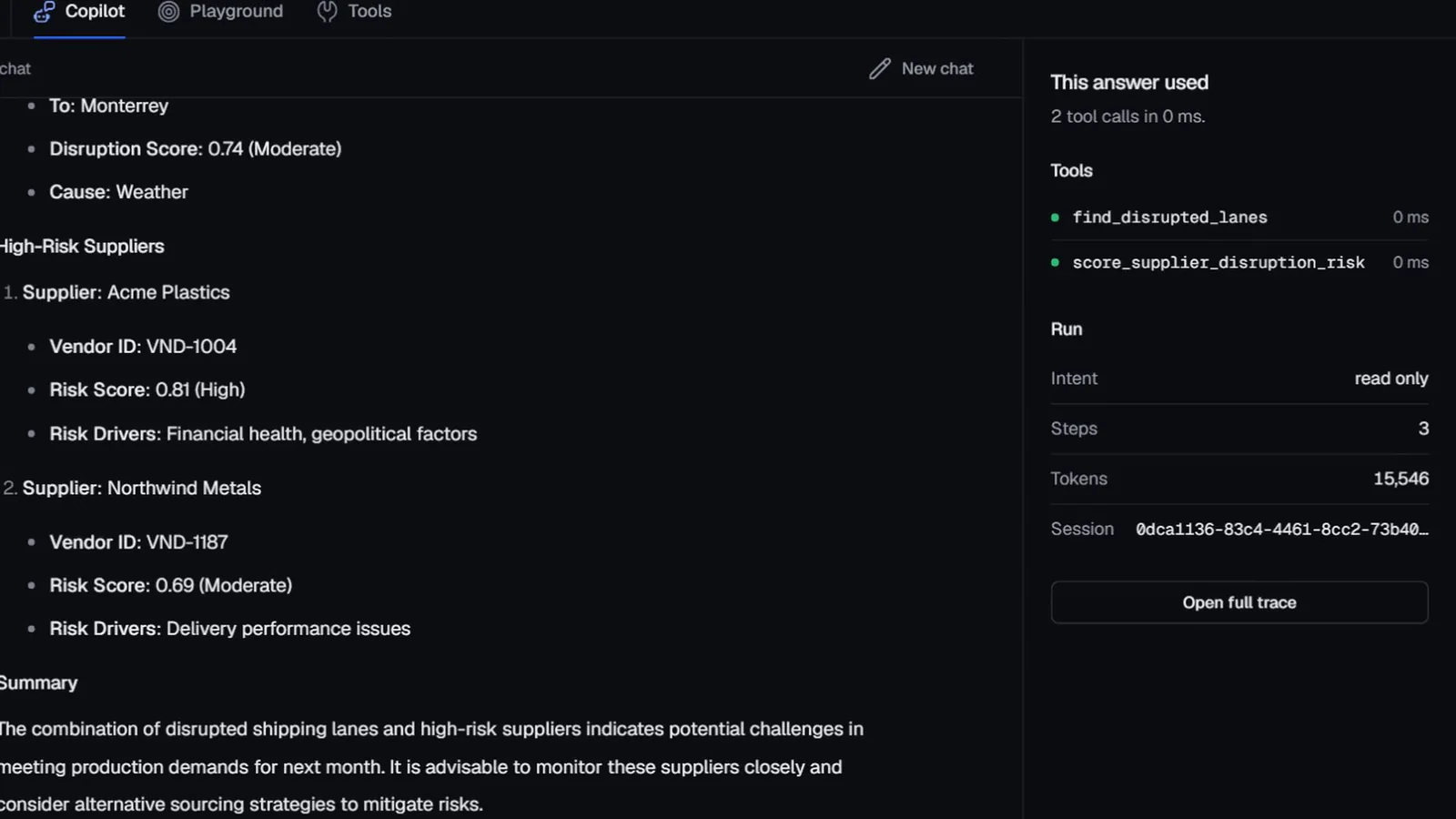
The agent used two tools. One found disrupted shipping lanes, and the other scored suppliers for disruption risk. It came back with the lanes, the suppliers at risk and why, and a short summary. The panel on the right shows exactly which tools ran and that the run only read data.
That trail is the most important part of the screen. Because the agent works in small steps, each one can be checked.
Why agents need guardrails, not just prompts
Here is the catch. Once an AI can take actions, a mistake is no longer just a bad sentence. It might be a wrong credit hold, a duplicate refund or a purchase order nobody wanted.
A common first instinct is to write the rules into the prompt: “Never approve payments over the limit.” That feels like a rule. It isn’t. It’s a sentence the model will usually follow. “Usually” is fine for a draft email. It isn’t fine for a ledger.
So in an enterprise, the prompt should be the last line of defence, not the first. Five guardrails come before it:
- Defined tools. The agent can only call the tools it’s given. No tool, no action.
- Policies outside the model. Rules live in the platform, attached to the business objects they govern. The model can propose. The policy decides.
- Approvals for risky actions. Anything that can’t be undone, is high in value or falls outside policy waits for a person.
- An audit trail. Every question, tool call, policy check and approval is recorded by the platform, not by the agent.
- Limits and scopes. An agent sees only what its user is allowed to see, and acts only within set limits.
Notice that none of these depend on the model behaving well. That’s the point. A guardrail should hold even on the day the model doesn’t.
Guardrail 1 in practice: a tool list you can read
Every tool an agent can use should be listed in plain language, with what it does, which system it calls and how risky it is.
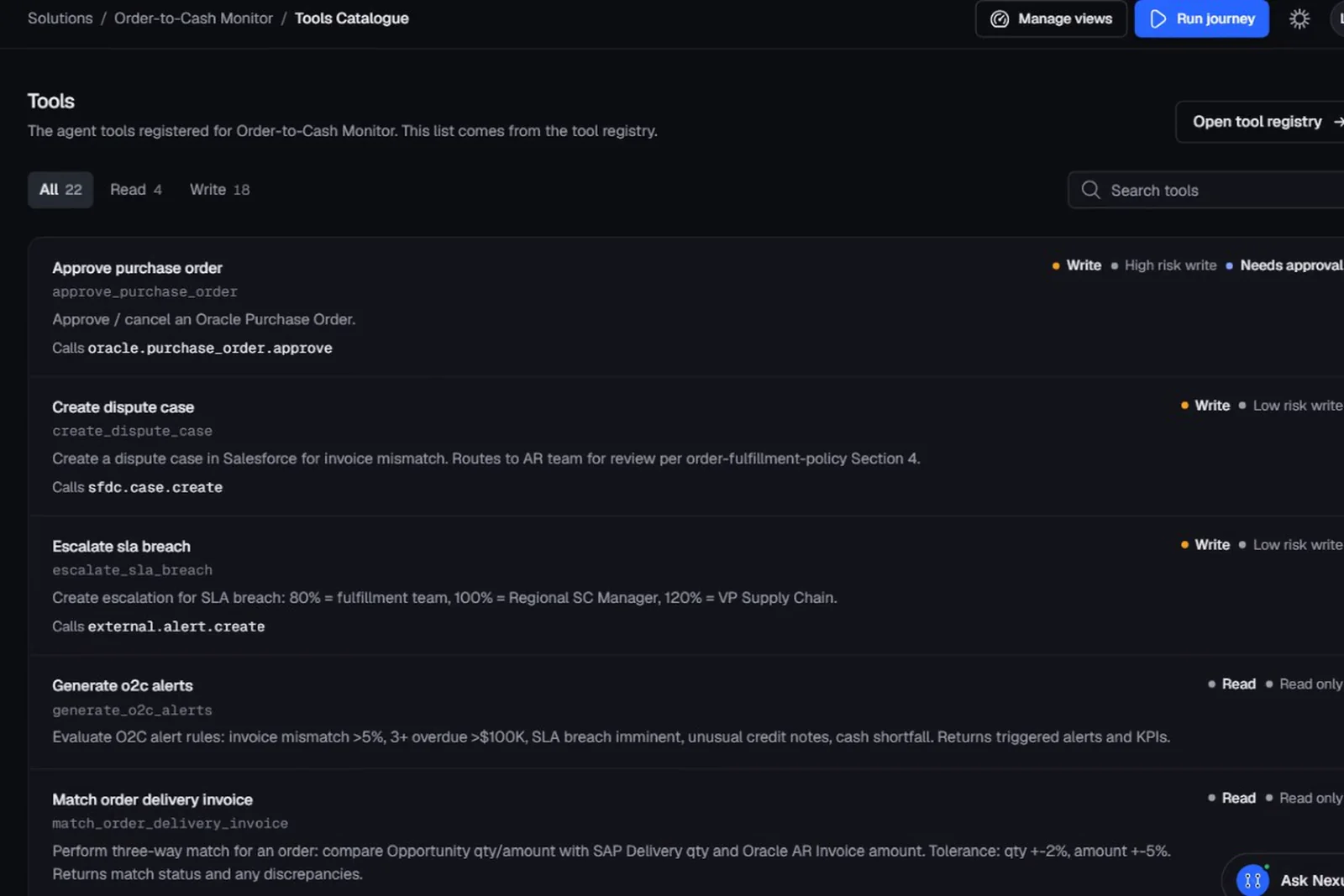
The order-to-cash catalogue above has 22 tools: 4 that only read and 18 that write. Approving a purchase order in Oracle is marked as a high-risk write that needs approval. If a tool isn’t on the list, the agent simply can’t do it.
This list changes the conversation with security teams. They don’t have to review the model. They review the list.
Guardrail 3 in practice: approval gates
For actions that matter, the agent stops and a person decides.
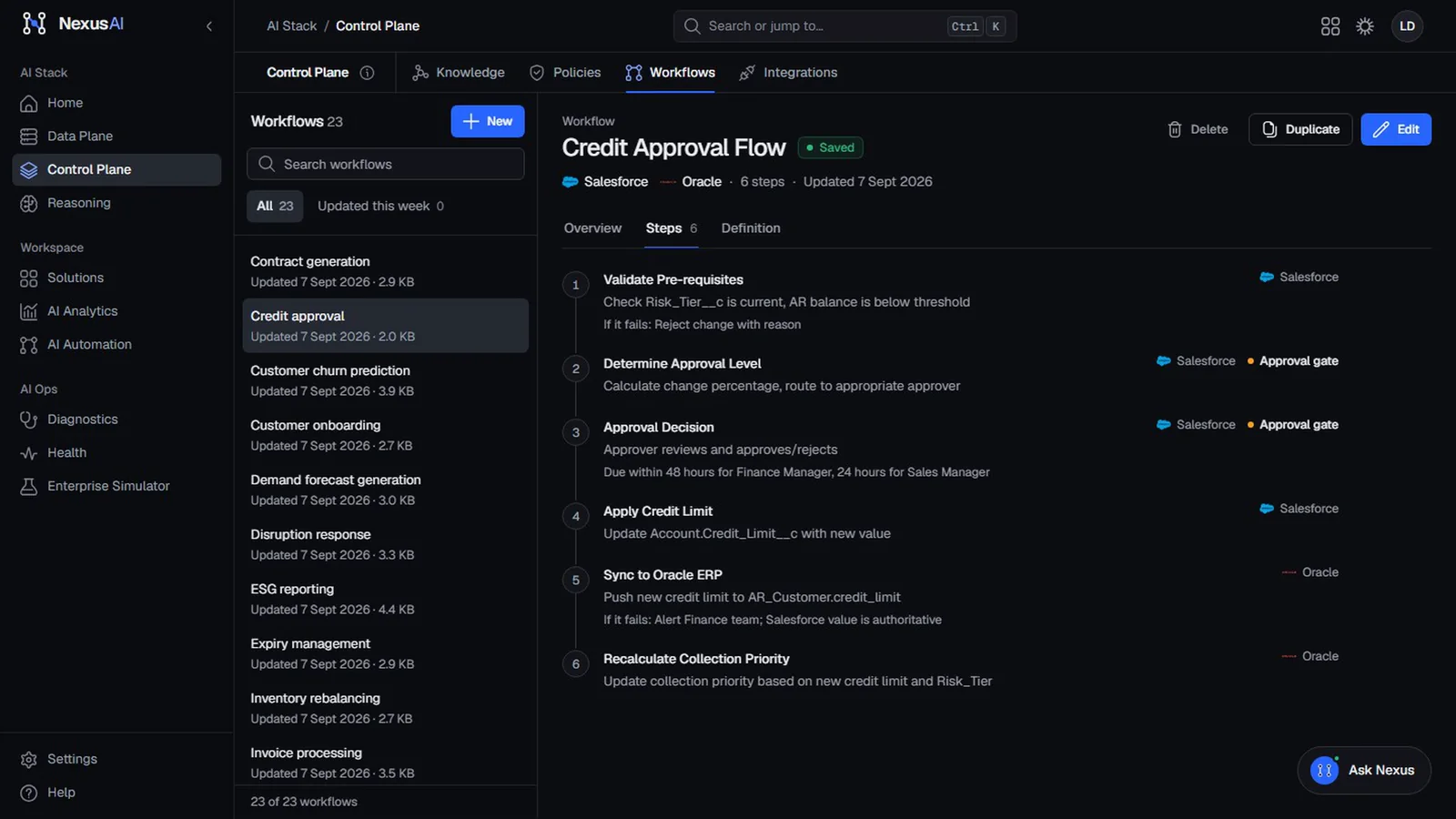
In this credit approval workflow, two of the six steps are approval gates, and the decision has a deadline: 48 hours for a finance manager, 24 for a sales manager. The agent waits at the gate. It doesn’t look for another way round.
Jasmin Makasana explains how to decide where gates belong in “where AI agents should stop” (coming soon).
Is agentic AI ready for the enterprise?
Yes, with the right foundations. In our view, three things need to be in place:
- A model of the business, so the agent works from real facts and real rules rather than guesses. Our guide to enterprise ontologies explains this part.
- Controls outside the model: defined tools, enforced policies, approvals and an audit trail.
- A clear trail for every answer and action, so people can check the work. Akbar Ahmed Khan covers this in “four parts of an AI answer people can trust” (coming soon).
Prompts guide an agent. Guardrails govern it.
If you’d like to see an agent working on real screens, take our product tour, or request a demo on a process of your own.
Frequently asked questions
What is agentic AI in simple terms?
AI that works through a task in steps: it plans, uses tools to look things up or take actions, checks what came back, and carries on until the task is done, instead of producing a single answer from memory.
How is an AI agent different from a chatbot?
A chatbot answers from what it already knows. An agent can call tools, such as a lookup in your ERP or a request to create a case in your CRM, so it can work with live data and take actions.
Is agentic AI safe for enterprise use?
It can be, if the controls sit outside the model. That means a fixed list of tools, policies enforced by the platform, approvals for risky actions, an audit trail, and limits on what each agent can see and do.
What is ReAct?
A common pattern for AI agents. The agent reasons about what it needs, acts by calling a tool, observes the result, and repeats. Because it works in small visible steps, every step can be checked.